
Flash CTF - Legacy Clause
Solution
The challenge provides a memory dump file. Running strings reveals that it came from a Kali Linux machine.
Linux memory forensics challenges usually require us to create a symbol table so that Volatility can analyze the dump. However, I was unable to create one for this memory image, so I decided to take a different approach.
The alternative was to recover raw images from memory without relying on Volatility or a symbol table. I treated the entire dump as a raw byte stream and searched it directly for remnants of bitmap data.
Steps:
- Change the dump file's extension to
.dataso that GIMP recognizes it and allows it to be opened as Raw Image Data. - Open the file with GIMP (
gimp file.data) and select Raw Image Data. Brute-force the width, height, and offset values until the pixel patterns begin to form a recognizable image instead of random noise. - Start with common screen resolutions such as
1024x768,1280x800, and1920x1080, since the image dimensions may match the display resolution used when the memory dump was captured. - Adjust the offset in small increments, such as 4 KB (the size of one memory page), to scan different memory regions. The image may not begin at the start of the file because padding or metadata can precede it.
After brute-forcing the parameters, I recovered a terminal screenshot showing the command used to encrypt flag.txt.
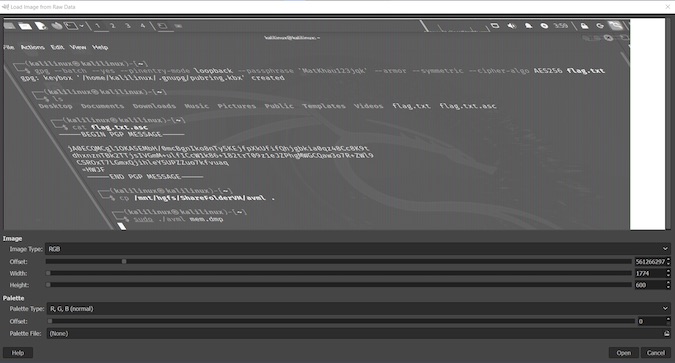
The encrypt command:
gpg --batch --yes --pinentry-mode loopback --passphrase 'MatKhau123jqk' --armor --symmetric --cipher-algo AES256 flag.txtContents of flag.txt.asc:
-----BEGIN PGP MESSAGE-----

jA0ECQMCgl1OKA5EMbH/0mcBgnIko8nTy5KEjfpXkUfifQhjgbkia0qz48Cc8K9t
dhxnznTBk2TTjsIVGmM+ulfICcW1k86+I82trT09z1eJZPhgMWGCQaw3o7R+ZWl9
CSROxT7LGmxQjihleY5UPZZuo7kfvuaq
=HWJF
-----END PGP MESSAGE-----
Decrypt the file:
$ gpg --batch --pinentry-mode loopback --passphrase 'MatKhau123jqk' --decrypt flag.txt.asc
gpg: AES256 encrypted data
gpg: encrypted with 1 passphrase
SkillBit{Thr0w_AI_ag3nt_4nd_use_uR_Br41n}This successfully reveals the flag.